

Seiko Radio Wave Control Solar Titanium – Limited Edition (No. 66/100, Ref. 7B22-0BB0)
Seiko Radio Wave Control Solar Titanium – Limited Edition (No. 66/100, Ref. 7B22-0BB0)
This model is a technically and conceptually interesting execution within Seiko's radio-synchronized solar watches. The combination of radio wave control, solar technology, and a titanium case clearly positions this watch in the high-end everyday segment of Japanese JDM models.
The installed Caliber 7B22 is one of Seiko's classic radio-controlled calibers: the watch automatically synchronizes with time signal transmitters (including Japan, USA, China) and precisely sets the date and time. Alternatively, manual adjustment is possible at any time.
Power is supplied by a solar cell located under the dial; when fully charged, the power reserve is several months.
The titanium case is particularly noteworthy: significantly lighter than steel, corrosion-resistant, and comfortable to wear. In combination with the dark coating and red accents, it creates a very distinctive, technically oriented look.
The limitation to only 100 pieces (here No. 66) is exceptional and rarely found among 7B22 models.
The overall condition is good to very good, with visible signs of wear typical for a titanium case.
Technical Data
- Brand: Seiko
- Reference: 7B22-0BB0
- Movement: Seiko Quartz, Solar, Radio (Caliber 7B22)
- Functions: Hour, Minute, Second, Date, Radio reception, Time zone function
- Case Material: Titanium (coated)
- Glass: Sapphire crystal (model-typical, not guaranteed)
- Water Resistance: 10 bar
- Diameter: approx. 40.8 mm (without crown)
- Height: approx. 10.3 mm
- Lug-to-Lug: approx. 46 mm
- Lug width: 20 mm
- Bracelet: Original titanium bracelet
- Special Feature: Limited to 100 pieces (No. 66)
- Scope of delivery: Original box incl. outer packaging
Quick Guide – Radio Reception & Setting (Seiko Radio Wave Control, Caliber 7B22)
This watch is designed to receive Japanese time signal transmitters (JJY40 / JJY60). Outside Japan, synchronization can be reliably achieved via smartphone apps ("JJY Emulator" / "Radio Wave Control").
1. Preparation
- Install radio clock simulation app
- Frequency: JJY40 or JJY60
- Volume: Maximum
- Deactivate silent mode
- Place smartphone directly next to the watch
2. Start Synchronization
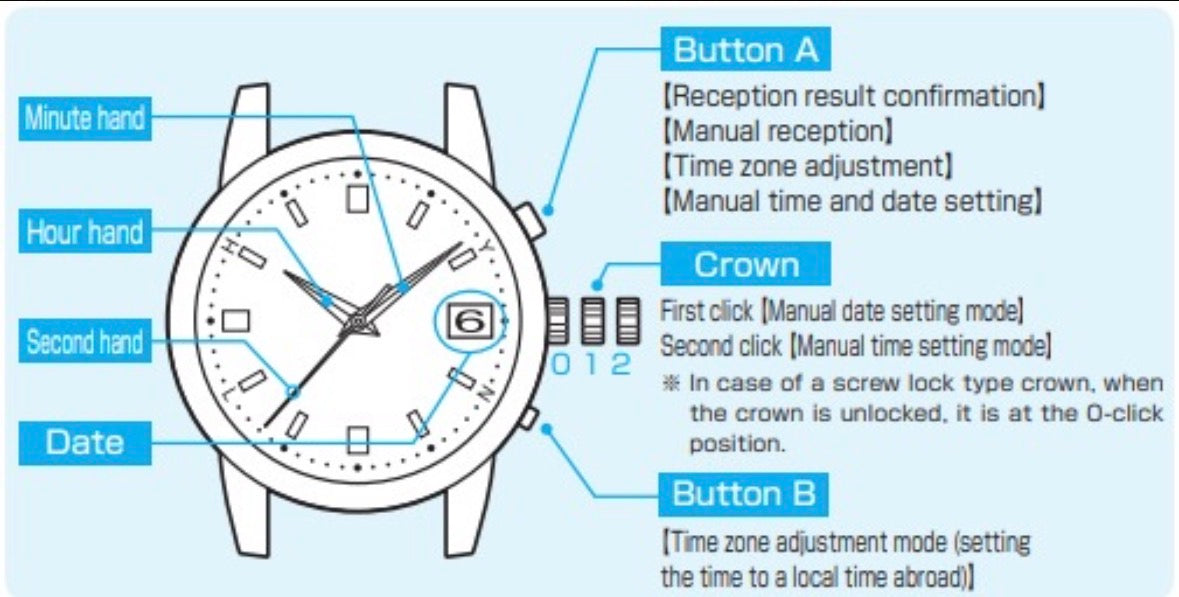
- Press and hold button A (see image) for approx. 4 seconds
- Second hand jumps to 0 / 60 seconds
3. Check Reception (after approx. 1 minute)
- Hands between 40–50 seconds → Signal is being received
- The closer to 50 seconds, the better the signal quality
- Hands at approx. 20 seconds → no reception → repeat the process
4. Complete Synchronization
- Process takes up to 12 minutes
- Do not move the watch during this time
5. Set Time Zone (e.g., Germany)
- Press button B once (e.g., with a toothpick)
- Second hand jumps back to 0 / 60
- Press button B 8 times → Position 52 seconds
- The watch will then automatically adjust correctly
6. Set Date (if necessary)
- Unscrew the crown
- Pull to the first position (1st click)
- Press button A until the desired date appears
- Push the crown back in and screw it down
Notes
- Best results in a quiet environment
- Position the smartphone as close as possible to the watch
- Repeat the process if necessary
Warranty (used)
This is a used item. The limitation period for claims for defects is 12 months from delivery.
Note
Water resistance is to be understood as a manufacturer's specification. Due to its age, no guarantee for water resistance is assumed. Contact with water should be avoided.
Share